Eclipses
Eclipses answers "when is the next one, where does it fall, and what does it look like" on a single page. It opens without assuming any one country: the headline names whichever eclipse comes next, world-neutral (something like "On September 2, 2035, a total solar eclipse happens somewhere on Earth."). Tap the globe, or press Use my location, to settle on a place — the headline and the list then switch to describing the view from there.
Solar and lunar eclipses share the same globe. A solar eclipse is total or annular only along a narrow track, so the globe draws a central line, a path of totality (or annularity), and the wider region where the Sun is only partly covered. A lunar eclipse has no track — it happens at the same instant for everyone who can see the Moon — so the globe instead shows the half of Earth currently facing the Moon and the point where the Moon stands overhead (a separate, optional diagram of the Moon crossing Earth's shadow is one tap away for anyone who wants it). Picking a place brings up a view from here card showing what the sky there actually looks like.
Times are shown in your device's own local time ("your time") and UTC — never pinned to Japan Standard Time. Open the page from the "Menu" button in the top-right of the screen, then choose "Eclipses."
Choosing an eclipse
The first thing to do here is settle on your own city. The panel on the right (a bottom sheet on a phone — pull it up with Choose an eclipse) opens on From your city: type a name into Search cities, press Use my location, or simply tap the globe. The moment a place is set, the whole page switches to answering "and what happens where you are?"
Below it, Coming up next names the day you should be looking up. With no place set it starts on whichever eclipse comes next, world-neutral; once a place is set the heading becomes Next eclipses visible from here and only eclipses you could actually see are listed. Each row carries a kind badge (Total solar, Annular solar, Partial solar, Total lunar, Partial lunar, Penumbral lunar), a date, and a one-line note on how it looks — world-neutral ("Total over Hokuriku & north Kanto") with no place set, or place-relative ("Total, here", "Not visible here") once one is. Click a row and the globe changes with it.
To hunt by date, open Browse every eclipse: 1700 through 2200, a decade at a time, filtered by Show me — All, Solar, or Lunar. Jump to the next one moves to whichever eclipse follows the current playback time. To hand an eclipse to someone else, press Copy link: the selected eclipse, the playback time and — if you set one — your place all fit in a single URL.
How this page works sits folded away at the foot of the panel. Open it when you need it: what the colours on the globe mean, and how the optional lunar diagram differs from the globe.
Reading the globe and the path
Pick a solar eclipse and the globe draws a bright central line, the band around it where the Sun is fully hidden (a ring of light, for an annular eclipse), and a blue outline further out enclosing everywhere the Sun is partly hidden. Those three together tell you at a glance where on Earth this eclipse falls. The legend beside the globe spells out each colour. Drag to spin the globe, and use the wheel — a pinch on a phone — to move in.
Whether the band crosses your own town is a question you answer by setting a place. Click or tap any point on the globe, or press Use my location, and the view from here card answers it: one sentence for how much is hidden at most and roughly when, then a drawing of the Sun and Moon overlapping at their true relative sizes. The drawing is exactly the computed geometry, and it says so — the colour and brightness of the sky, and distortion near the horizon, are not reproduced.
For the fine detail, open Exact times: first bite through last bite, the magnitude and the obscuration, and the height of the Sun (or Moon) at that instant. If that height is below the horizon, both the drawing and the times say so plainly — the point being to save you a wasted trip. Clear this location returns the page to its world-neutral view whenever you want it back.
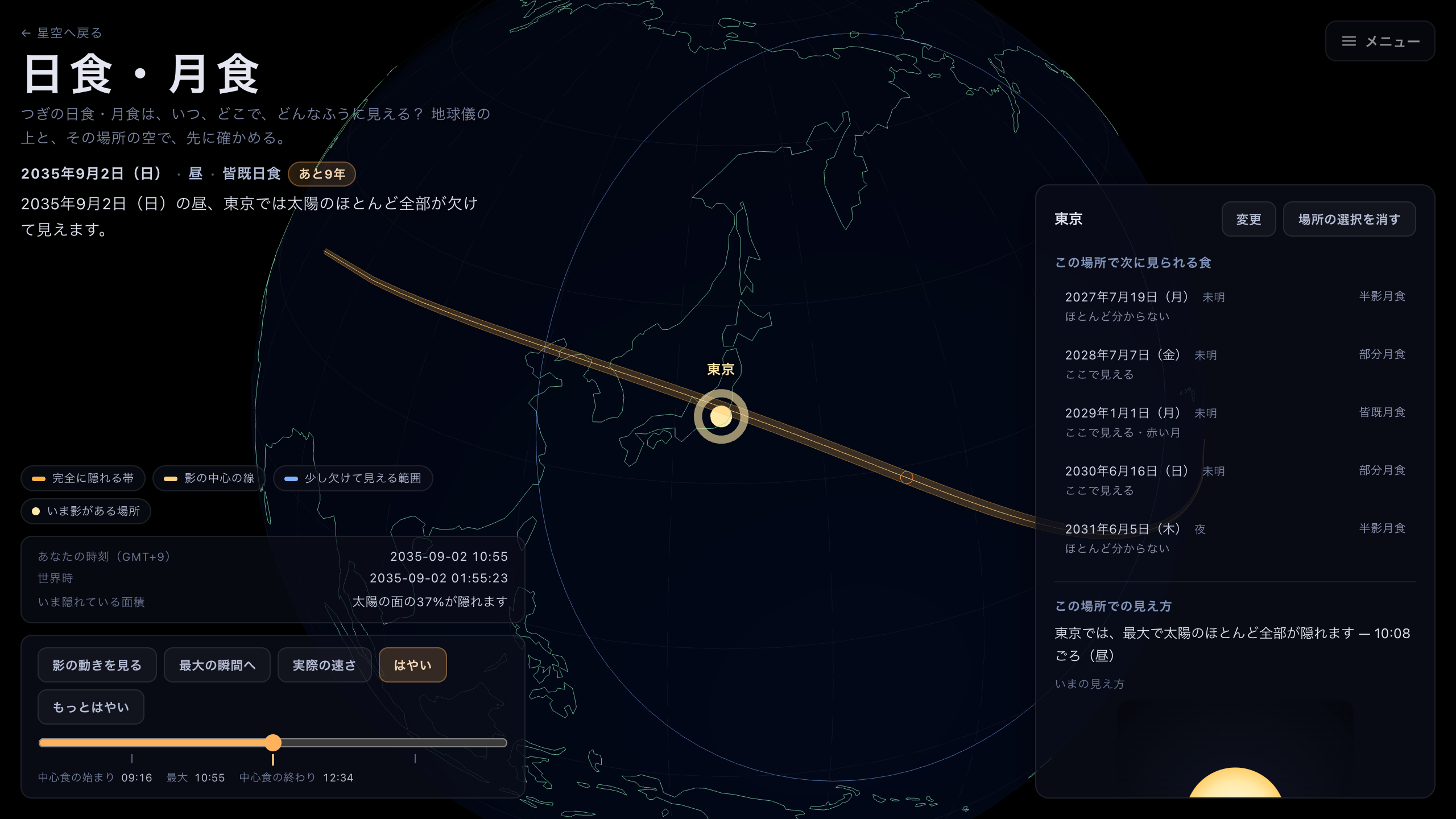
The total solar eclipse of 2 September 2035. The band slanting across Japan is where the Sun vanishes completely.
Playing through it
Press Watch the shadow move — Watch the Moon cross, for a lunar eclipse — and the whole event runs from start to finish. The orange dot sliding across the globe is where the shadow is falling. Speed is Real speed, Faster (1 s = 1 min), or Fastest (1 s = 10 min); since the real thing takes hours, the quick way is to run it at Faster, watch the whole arc, and Pause where it gets interesting. Jump to the peak takes you straight to the moment worth seeing.
Drag the Time scrubber to move to any instant directly. Milestones — first bite, peak, last bite — are marked along the track, so you can aim for them. Change the time and the shadow on the globe follows, as does Hidden right now if you have set a place.
The current playback time sits along the bottom in two rows: UTC, and Your time. The zone in the brackets is whatever your device is set to (Your time (JST), for instance) — nothing here is pinned to Japan Standard Time.
Lunar eclipses and the diagram
A lunar eclipse runs identically, at the same instant, for everyone who can see the Moon. So there is only one question worth asking: is the Moon up in your sky at the time? Select one and the globe draws Inside the bright line: the Moon is up, along with the point where the Moon is overhead — and whether your town falls inside that line is the answer. Set a place and the view from here card states the Moon's height there and a plain visible / not-visible verdict.
The textbook picture — the Moon crossing Earth's shadow — is available too, via Diagram: Earth's shadow and the Moon's path beside the legend. A badge stays on screen the whole time it is open, saying it is a diagram and not a view of the real sky: it is there to make the umbra and penumbra legible, not to show what a telescope would see.
While playback runs, How deep the Moon goes (umbral magnitude) appears along the bottom, so you can follow the bite numerically. Depth in the faint shadow (penumbral magnitude) is on the At a glance card instead. Magnitude is a fraction of the body's diameter and obscuration a fraction of its area — different quantities (at magnitude 0.5 only about 39% of the area is hidden). A penumbral eclipse never reaches the umbra, so it has no umbral magnitude to show.
A note on accuracy
Contact times and the edges of the path carry an error of seconds to minutes. The Moon's limb profile (the mountains and valleys behind Baily's beads) and terrain elevation are not modelled. Always check an official prediction, such as from a national observatory, before planning an observation.
The catalog covers 1700 through 2200; eclipses outside that range are not included.