Starflight
Starflight draws the stars in real 3D: not pasted onto a celestial sphere, but placed at the distance their parallax implies. The constellation lines join the stars themselves, so once you leave Earth the lines bend and the familiar shapes fall apart — no animation, just geometry.
What you see the moment it opens is the night sky exactly as you see it from Earth. From there you can fly out to Sirius or Betelgeuse and look at the night sky from beside them. Brightness is computed from wherever the camera is, so the Sun fades as you go, and eventually disappears.
Open it from the "Menu" button in the top-right of the screen, then choose "Starflight."
Flying
Drag to turn your view, and use the mouse wheel — a pinch on a phone — to fly forward. The very first turn of the wheel lifts you off Earth into free flight, and that is where the constellations start to come apart. Ctrl+wheel, or the − and + keys, sets the field of view anywhere between 15° and 110°. The panel's Field of view slider moves the same number — and with no Ctrl key and no wheel, it is the only way to change it on a touch screen.
The keyboard flies too. W and S are forward and back thrust that keep accelerating while held, which is how you cover the distance to a far star. A and D strafe sideways, R and F move up and down, and I, J, K and L swing your gaze without moving you.
Speed mostly takes care of itself: slow while something is close by, enormously faster between the stars — the camera rescales itself as you go. If it still feels wrong, the panel's Flight speed slider stretches the whole scale, from a quarter of normal to four times it. The distance-adaptive part stays in place, so "slow when something is near" survives the change. (This multiplier alone is not carried by a share link, and it returns to 1× when you leave the page.)
Click (or tap) a star to select it: a card for that star appears at the bottom-left. Double click, or double tap, and you fly to it. Clicking empty sky clears the selection. Below the card, the HUD shows your current mode, your distance from Earth, your speed, and your field of view. However far you go, Back to Earth returns you to the sky you started in.
On a phone, forward and back thrust buttons sit permanently at the bottom of the screen. A pinch has no "held" state, so use those buttons to accelerate. The explanatory panel becomes a bottom sheet: press Info to open it (the thrust buttons step aside while it is up). The speed and field-of-view sliders live inside that panel too.
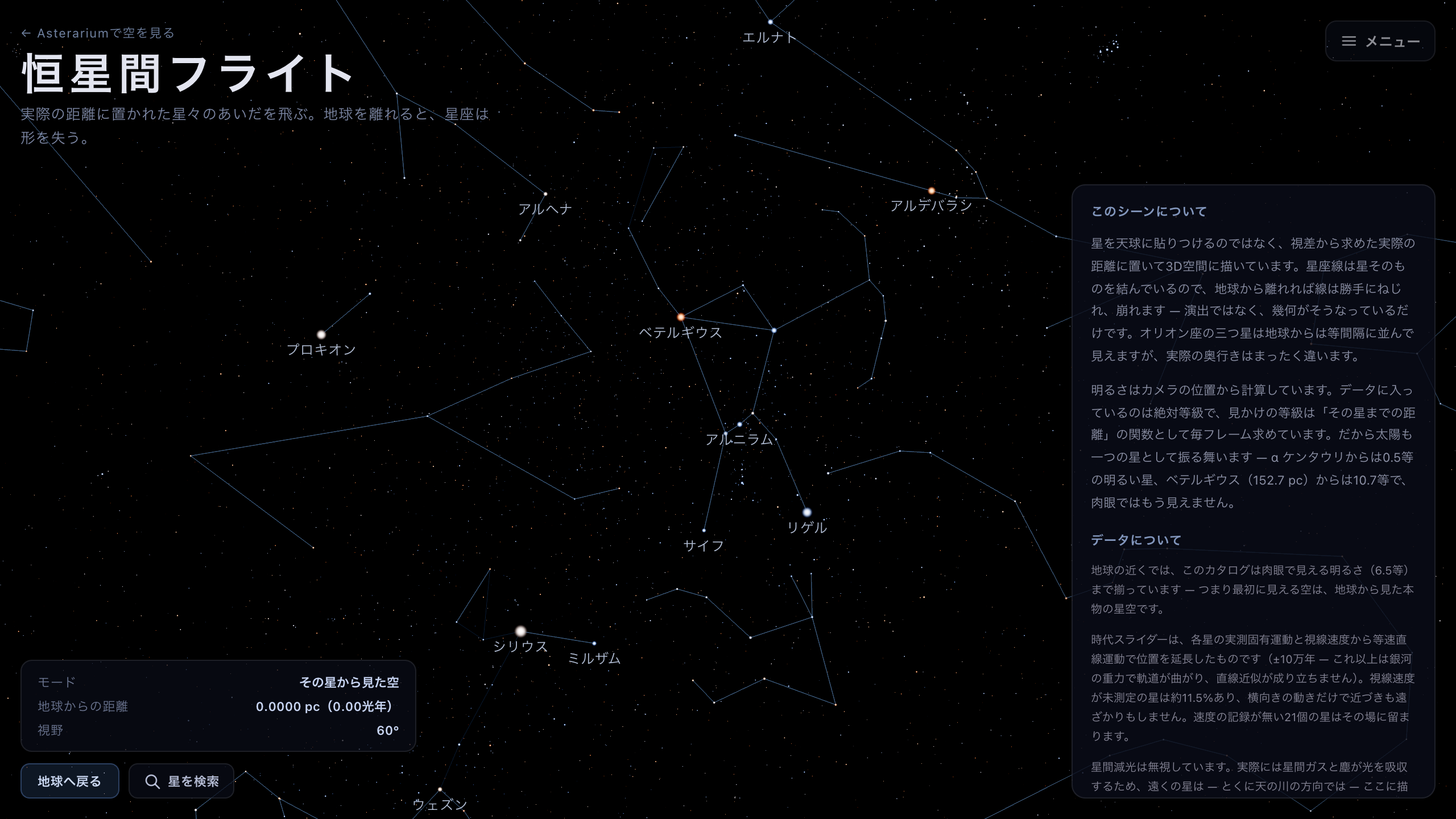
The sky you arrive in — you have not moved yet, so the constellations look exactly as they do from Earth.
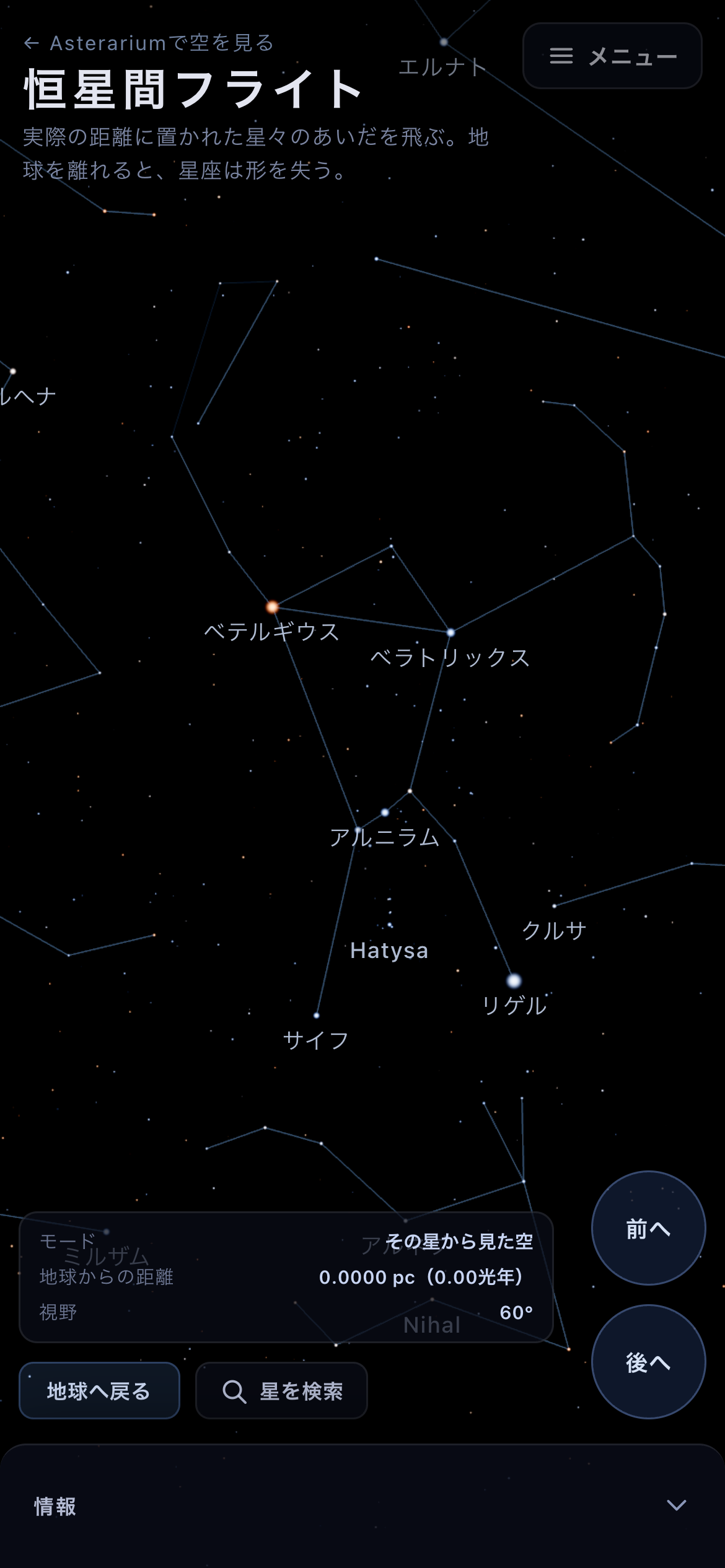
The phone screen. A pinch has no held state, so the thrust buttons at the bottom do the accelerating.
Three modes
The camera is always in one of three states. Free flight is ordinary flying: you can go anywhere. Orbit circles a star you have chosen — dragging swings you around it, and the wheel closes in. Sky from that star stands you at the star itself and looks up at its night sky.
You change state by flying, not by choosing from a menu. Fly to this star on a star's card — or a double click — puts you in orbit; See the night sky from it puts you on the star. Turn the wheel forward from either one and you are back in free flight. The Mode row of the HUD always tells you where you are.
A freshly opened page is "sky from that star" — the star being our own, so what you see is the sky from Earth. Back to Earth returns you to exactly that, at any time.
Choosing a star, and finding one
Selecting a star shows its distance from Earth, its distance from where you are, its apparent magnitude here, and its absolute magnitude. The apparent magnitude is derived from the camera's position every frame: brighter as you approach, fainter as you leave — and the Sun is no exception to that.
Stars whose distance does not come from a Gaia parallax carry a line saying so. It means the source is different, not that the number is poor: Sirius carries it too, being far too bright for Gaia to measure.
The panel's Jump to a famous star lists thirty stars, from Sirius to Barnard's Star. Pressing one flies you there and settles into orbit. Faint entries such as Proxima Centauri may not respond until the full catalog has finished loading.
When thirty is not enough, search. The magnifier at the bottom-left of the screen — there is a second one in the panel, just above the famous-star list — opens Find a star, and so does the / key. Type in either language: "Betelgeuse", "ベテルギウス" and "べてるぎうす" all reach the same star, as do a Bayer designation such as α Ori and a catalogue number such as HIP 27989. About 1,850 stars carry a name or a designation to be found by.
Press Enter on a row and you fly there and settle into orbit; hold Shift as you press it and you go all the way to standing on the star, looking at its night sky. Clicking and shift-clicking do the same. A row marked Loading is a faint star the full catalog has not delivered yet — wait a few seconds and it becomes reachable.
At the foot of the card is See it in the sky. It takes you to the planetarium and turns the camera toward that star in your own sky, right now. If the star is below your horizon the view stops pointing down at it, and its card there tells you when it next rises — not being able to see it is one of the things worth knowing about a star. The link runs the other way too: select a star in the sky and its card offers Fly to this star in 3D, which brings you back here.
Constellation lines, constellation names and star names each have a checkbox in the panel. Constellation names start switched off — they stop meaning anything once you leave Earth's neighbourhood.
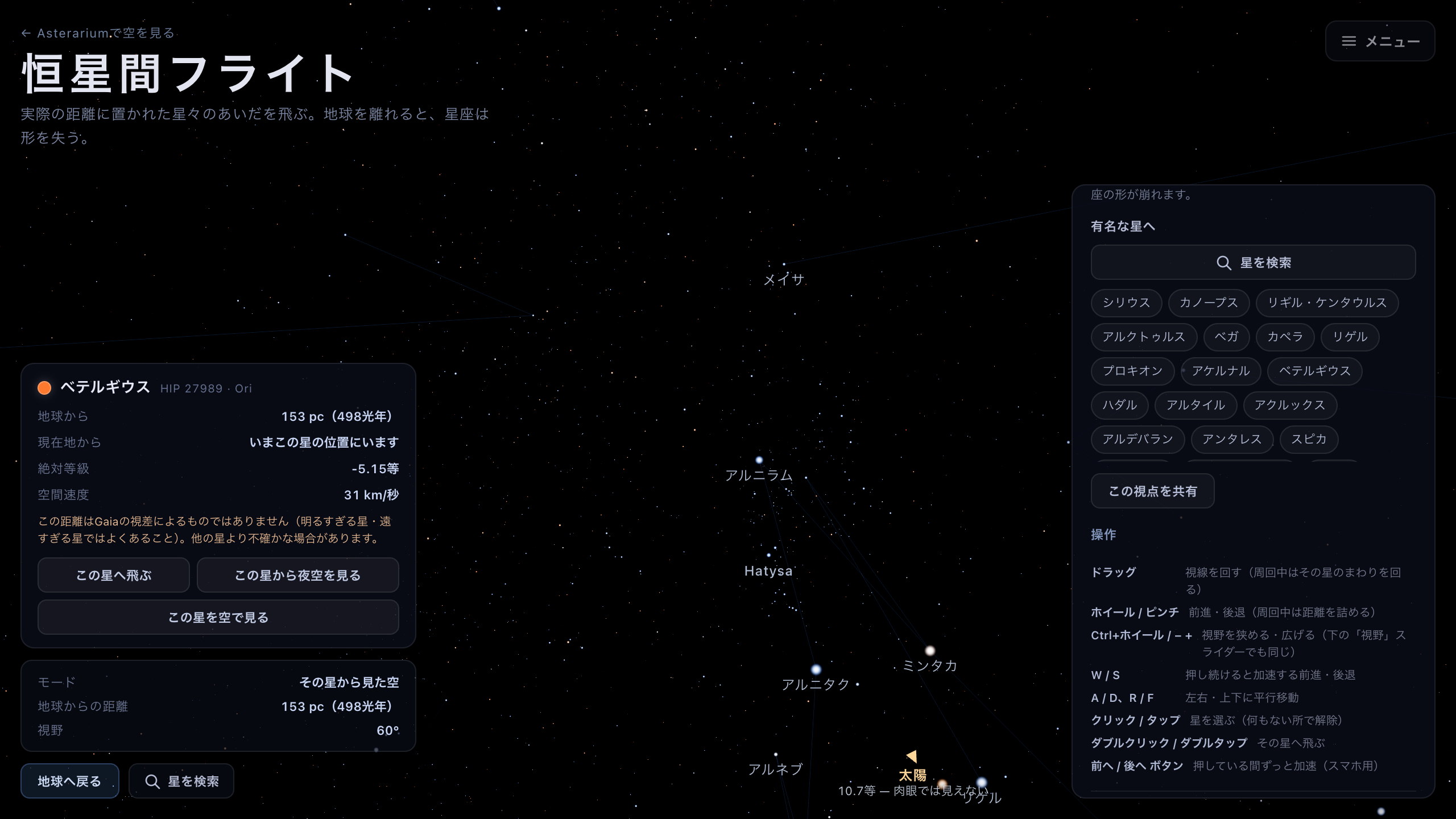
The night sky from Betelgeuse, 498 light-years out. The lines join the same stars as ever — the shapes are gone.
Seeing a constellation from the side
The panel's See a constellation from the side offers four viewpoints. Pressing one moves the camera to a place from which that figure reads as a solid object. Unlike flying to a star, what you are heading for is a place, and the heading and field of view are part of it: each one is a composition. On arrival, that figure's lines alone light up.
Orion from the side is the page's whole argument in a single frame. From Earth the three belt stars are evenly spaced within 3°; step 150 pc to one side and Alnitak and Mintaka (226 and 212 pc) stay together while Alnilam, 606 pc away, is left stranded 20° off on its own. The hourglass has collapsed into a knot barely 10° across.
The other three each teach something else. The Big Dipper's depth shows, from only 30 pc off to the side, that five of the seven belong to one moving group and that Dubhe and Alkaid were merely passing through. Unfold Cassiopeia's W takes a figure spanning a factor of ten in depth — Caph at 17 pc, γ Cas at 168 — and, seen from 60 pc to the side, straightens it into a single line in distance order; Caph itself drops from magnitude 2.3 to 5.1, because it was never a luminous star, only a close one. The Southern Cross is not a cross means exactly what it says: Gacrux alone is 27 pc away, so the long arm swings round until the two strokes lie almost parallel.
The further a viewpoint stands from Earth, the fainter its constellation lines are drawn: a figure is only ever the shape seen from one particular place, so it is made to argue less the further you get from that place. That is why Orion, 150 pc out, is the dimmest of the four — not a fault. Clear highlight puts the highlighted lines back to normal. The highlight rides along in a share link too, so "look at Cassiopeia from here" fits in one URL. Directly below the viewpoint buttons sit the speed and field-of-view sliders — useful for widening the frame a little once you arrive, or for circling slowly. All four viewpoints leave you in free flight, so you can simply carry on.
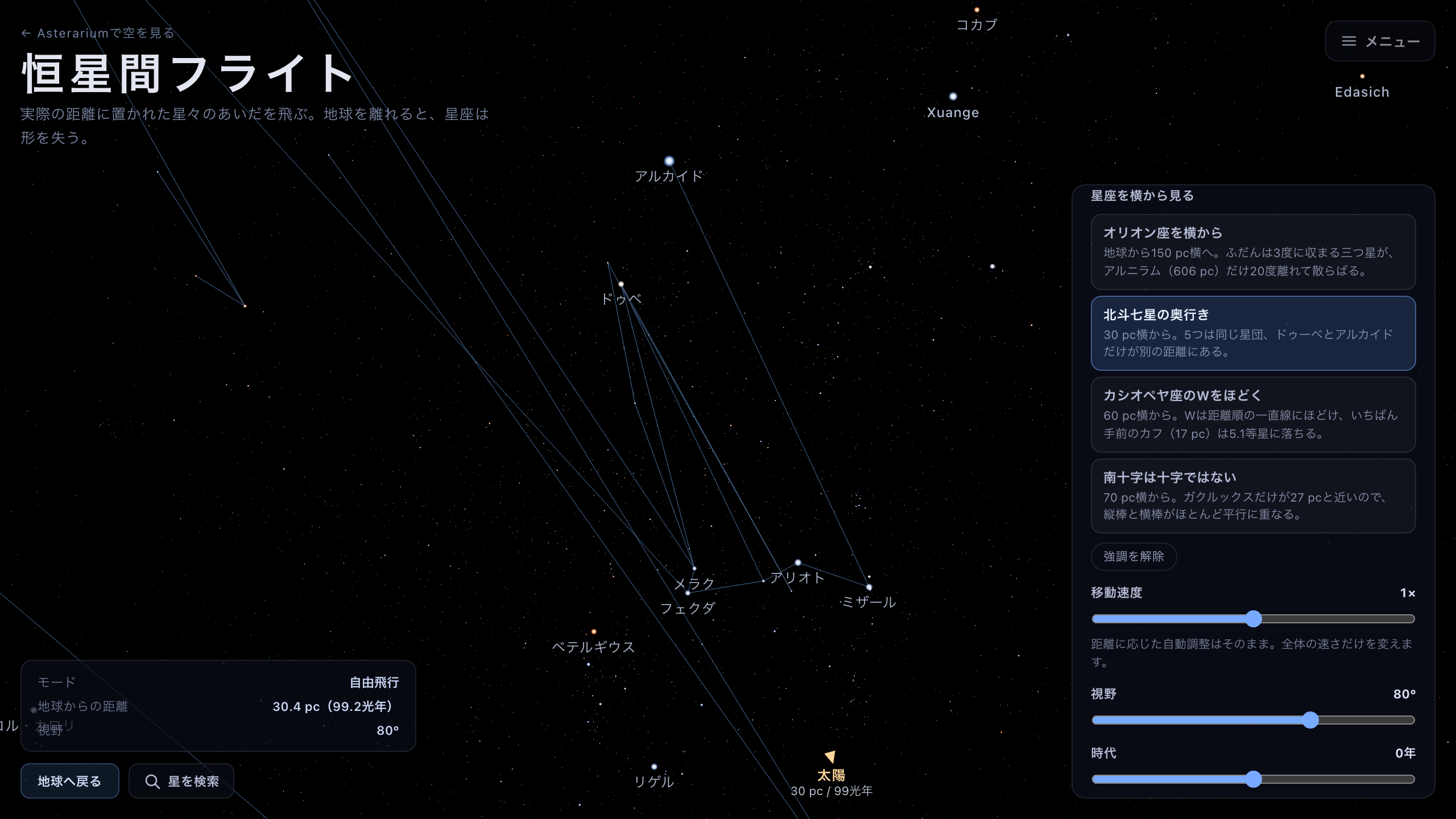
The Big Dipper's depth. Thirty parsecs sideways is enough to buckle the saucepan — and little enough that the rest of the sky is still the familiar one to compare it against.
Moving time, and letting the tour drive
The panel's Epoch slider moves the stars at their measured speeds. The middle is now — the year 2000 — and each side runs out to 100,000 years. Scrub it and the nearest stars stream fastest across the sky while the figures buckle. Try it on the Big Dipper: 100,000 years from now, the saucepan is not a saucepan. Back to now returns you to today's sky at any point. None of this is a prediction: it is measured proper motion and radial velocity extended in a straight line, and it stops at 100,000 years because beyond that the Galaxy's gravity curves the paths and the straight line becomes a lie. One caveat: about 11.5% of the stars have no measured radial velocity yet. Those drift sideways but never approach or recede, and 21 stars with no velocity at all simply stay put. A star's card tells you which kind you are looking at.
If you would rather be shown, press Watch the tour. It flies six chapters in about two minutes: out from Earth, past Orion seen from the side, standing on Betelgeuse, around the Big Dipper — and there it runs the epoch 100,000 years forward and back — then home. A short caption for each chapter appears along the bottom. Skip moves to the next one and End stops it, but you do not need either: drag, turn the wheel, or press a key, and the tour ends the instant you do, handing the controls straight back to you.
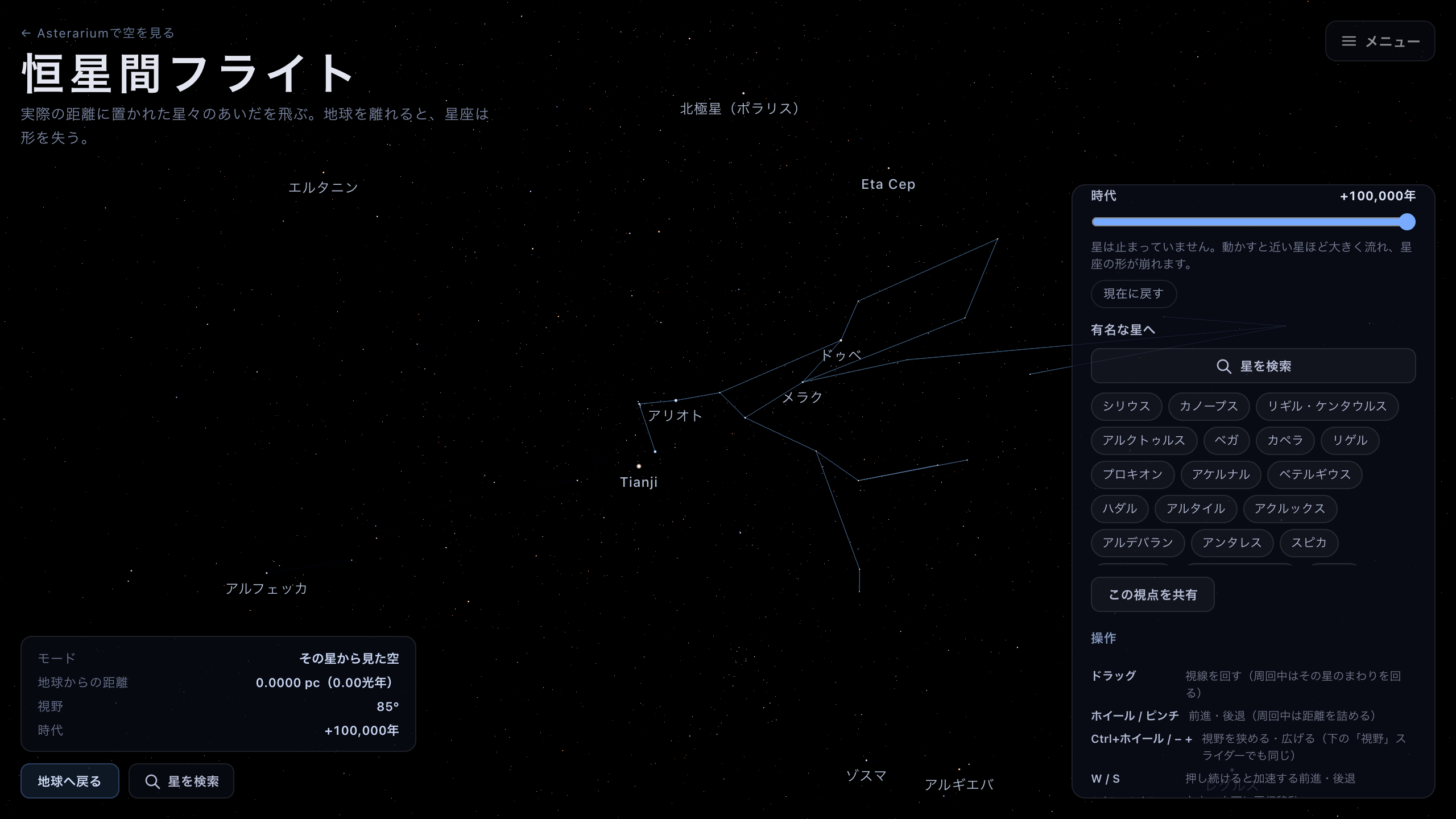
The Big Dipper 100,000 years from now. The vantage point has not moved — the stars have — and the saucepan is no longer a saucepan.
Caveats & sharing
Interstellar extinction is ignored. In reality gas and dust absorb starlight, so distant stars — especially toward the plane of the Milky Way — are dimmer and redder than they are drawn here.
The catalog is also only so complete. Near Earth it holds everything down to naked-eye brightness (magnitude 6.5), but the further out you go, the more stars are missing that would have been visible from where you stand. The note in the panel keeps quoting the radius, in parsecs, within which that is true right now. A distant star's sky looks sparse for that reason, not because the rendering is broken.
The scene starts on a lightweight ~34,000-star catalog and swaps in the full ~120,000-star one once the connection is idle. That is why faint stars sometimes appear all at once while you are looking.
Share this view copies a URL carrying your position, heading, field of view, mode, selected star, display switches, whichever figure is highlighted, and where the epoch slider stands. Whoever opens it lands on exactly the view you were looking at — highlight and all, and 100,000 years out if that is where you were.